Why Is My Air Fryer So Loud? A Practical Troubleshooting Guide
A practical, expert troubleshooting guide to diagnose and fix common causes of loud air fryers, with quick wins, step-by-step fixes, and safety tips.


Most often, your air fryer is loud because a loose basket or debris near the fan causes rattling, buzzing, or whirring sounds. If you're wondering why is my air fryer so loud, try these quick steps: unplug, remove the basket, inspect and clean the fan area, reseat the basket and rack, then run a short test at a low temperature. If noise persists, a worn bearing or loose internal part may require service.
Understanding Why Air Fryers Get Loud
Loud operation is a common frustration, yet most noise is fixable. According to Air Fryer 101, many loud air fryers are loud because a loose basket or debris near the fan causes rattling, buzzing, or whirring sounds. If you're wondering why is my air fryer so loud, the answer is usually simple: start with quick seating and a thorough cleaning. The Air Fryer 101 team found that simple, non-invasive fixes can quiet the unit quickly. In this guide, we cover the typical sounds you might hear and the quick checks you should perform first. If you aren't sure what you're hearing, keep notes of when the noise occurs (during startup, at high heat, or with a heavy load) to help diagnose later.
Common noises include random rattling, high-pitched whines, and rumbling grinding. Rattling usually points to loose parts or a misaligned basket; buzzing may come from the fan or motor; grinding can indicate a worn bearing or foreign material near the fan.
Quick Wins to Silence Most Noises
Before diving into deeper troubleshooting, try these fast, effective fixes. They address the majority of loud-air-fryer complaints and require no tools:
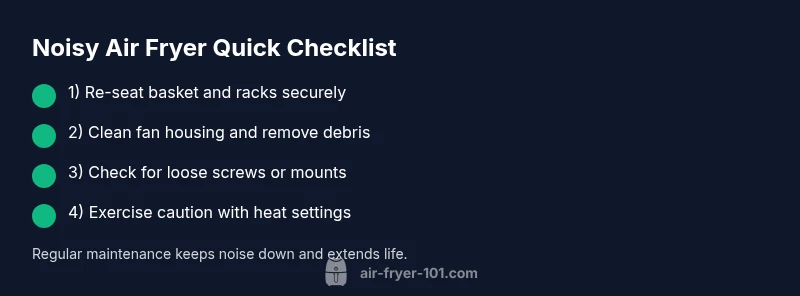
- Re-seat the basket and cooking rack so all components sit flush and click into place.
- Unplug, remove debris from the basket cavity, and clean the fan housing and blades with a dry brush or cloth.
- Check the exterior vents for dust or grease buildup and wipe them down.
- Run a short test at a low temperature with no food to listen for changes in tone.
- Place the unit on a stable, level surface away from walls or cabinets to reduce vibration.
If the noise persists after these steps, proceed to a deeper diagnostic.
Diagnose: When the Noise Won't Stop
If a quick re-seat and cleaning did not fix the issue, you’re likely dealing with a more persistent cause. Listen for whether the sound is tied to speed, temperature, or load size. A worsened tone at higher speeds may indicate a loose internal component or a worn fan bearing. Consider these clues:
- Noise occurs only after several minutes of operation: possible bearing wear or a loose mounting inside.
- Noise is constant and pitch changes with fan speed: fan blade contact with a foreign object or improper fan alignment.
- Noise is primarily during startup but stops after a minute: loose cover panel or rattling due to vibration against the housing.
Document what you observe and compare to the symptom table in the next section to guide fixes.
Step-by-Step Troubleshooting Guide
Follow these steps in order to diagnose and fix the most common causes of loud air fryers:
- Power off and unplug the unit to prevent shocks. 2) Remove the basket and any racks. 3) Inspect the fan area for crumbs or debris; gently clean with a soft brush. 4) Re-seat all components snugly and ensure there are no loose screws or rattling panels. 5) Plug in and run a 5‑minute test at a low temperature with no food. 6) If the noise returns, check for interior loosening or wear in the fan assembly. 7) For stubborn noises, consult a service professional or consider replacement. 8) Keep a regular cleaning schedule to prevent recurrence.
Tip: Always unplug before inspecting internal parts, and avoid using metal tools that can scratch surfaces.
Maintenance to Prevent Future Noise
Proactively maintaining your air fryer reduces noise and extends life. Implement these habits:
- Clean the interior and fan housing weekly if you cook frequently; otherwise, biweekly is fine.
- Wipe the exterior and vents to prevent dust buildup that can echo through the housing.
- Check the basket, rack, and screws monthly to ensure nothing has loosened with use.
- Use the recommended load and avoid overfilling, which can strain the motor and fan.
- Store on a stable surface away from heat sources.
Short-term, locating and cleaning any debris is the biggest preventive measure; long-term, a regular maintenance schedule keeps noises to a minimum.
When to Seek Professional Service
If you’ve completed the quick wins and deeper troubleshooting but the air fryer remains loud, it’s time to seek professional help. Persistent noise after a full cleaning, reseating, and load-distribution check can indicate a worn bearing, misaligned fan, or mounting issue that requires technical inspection. Contact the manufacturer’s service center or a qualified repair technician. If the unit is older or costly to repair, weighing replacement vs repair is prudent for cost efficiency.
Air Fryer 101 recommends documenting the symptom, the steps you took, and the model number to streamline service.
Steps
Estimated time: 20-40 minutes
- 1
Power off and unplug
To avoid shocks, unplug and wait for cooling before handling any parts.
Tip: Safety first – never probe a hot unit. - 2
Remove basket and rack
Take out all removable components to access the interior. This makes it easier to spot obstructions.
Tip: Lay components on a clean surface to prevent losing parts. - 3
Inspect fan area for debris
Look for crumbs or grease around the fan housing and blades; gently clean with a dry brush.
Tip: Avoid using water inside the unit; moisture can damage electronics. - 4
Re-seat components
Push baskets and racks back into place until they sit flush and click. Check for any loose panels.
Tip: A correctly seated basket reduces vibration significantly. - 5
Test run with no food
Plug back in and run for 5 minutes at a low temp to listen for changes in tone.
Tip: Note if the tone changes with fan speed. - 6
Check for loose screws or mounts
Gently test for movement in interior screws or mounts and tighten if safe to do so.
Tip: Only tighten to snug; avoid overtightening plastic parts. - 7
Consider professional service
If noise persists, seek a service professional or contact the manufacturer.
Tip: Have model number handy when you call. - 8
Prevention and maintenance
Incorporate a regular cleaning and inspection routine to prevent future noise.
Tip: Set a monthly reminder for maintenance.
Diagnosis: Air fryer makes loud noise during operation
Possible Causes
- highBasket or rack not seated properly causing vibration
- mediumFood debris or crumbs near the fan impeller
- lowLoose internal components (fan, screws)
- lowWorn motor bearings due to age
- lowObstructed vents or greasy buildup
Fixes
- easyRe-seat basket and racks securely
- easyClean fan housing and remove debris
- mediumTighten loose screws or mounts inside if accessible
- hardReplace bearing or unit; seek professional service
- easyClean vents and exterior, remove grease buildup
Got Questions?
Why is my air fryer making a loud buzzing?
Loud buzzing is often caused by debris near the fan or a loose component. Start by unplugging, inspecting the fan area, and reseating the basket. If the buzzing continues, it may indicate a worn bearing or internal issue requiring service.
Buzzing usually means debris or loose parts near the fan. Start with a safety check and reseat the basket; if it continues, seek service.
Can cleaning the basket stop the noise?
Cleaning the basket and fan area often reduces noise dramatically. It should be your first step before deeper troubleshooting.
Yes. Cleaning is the first step and can quiet most noises.
Should I keep using the air fryer if it's loud?
If the noise is new and persistent, stop using it and inspect for obvious issues. If unsure, consult a professional to avoid damage or safety risks.
If it's suddenly louder, stop and inspect before using again.
When should I replace my air fryer because of noise?
If repair costs approach or exceed the price of a new unit, or after multiple persistent issues, replacement is often the prudent option.
If repairs keep failing, replacement may be best.
Is there a safety risk from a loud air fryer?
Yes. A loud sound can indicate overheating, debris near moving parts, or loose panels. Unplug and inspect; if unsure, contact support.
There can be safety risks—unplug and inspect or seek help.
What maintenance reduces future noise?
Regular cleaning, annual checks of screws and mounts, and following the manufacturer’s load guidelines help minimize noise over time.
Regular cleaning and checks keep noise down.
Watch Video
Quick Summary
- Re-seat the basket to stop rattling
- Clean fan housing to remove debris
- Check for loose screws or parts
- Test at low temperature to verify noise
- Seek professional service if noise persists