Air Fryer Won't Preheat? Quick Troubleshooting Guide
Facing an air fryer that won't preheat? Air Fryer 101 walks you through fast checks, fixes, and prevention tips to restore reliable preheating and consistent results.


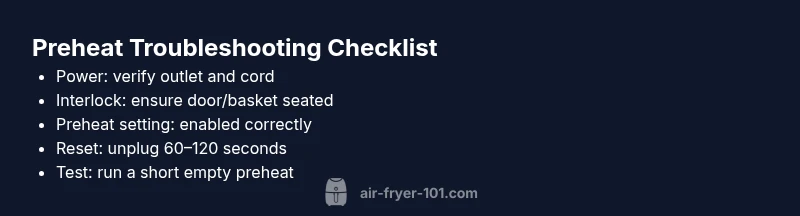
Most air fryers that won't preheat are caused by a tripped safety switch, an incorrect preheat setting, or a faulty thermostat. Begin with easy checks: confirm the outlet has power, make sure you’ve selected the preheat function, and reset the appliance by unplugging for 60–120 seconds. If it still won’t preheat, contact support or request service.
What preheating means for your air fryer
Preheating is the practice of warming the cooking chamber to a target temperature before you add food. It helps sear textures, reduce cooking time, and ensure even browning. Some models preheat automatically when you press a specific button, while others require you to set a timer and wait a few minutes. According to Air Fryer 101, understanding how your specific unit handles preheat is essential to troubleshooting. Start by consulting the user manual to confirm whether preheat is recommended for your typical recipes, and note any model-specific quirks (like shorter cycles for small batches). As a home cook, recognizing when preheating matters—such as making crispy french fries or evenly roasted vegetables—helps you decide whether to rely on preheat in each batch. When preheat is working correctly, the interior heat quickly reaches the set temperature, creating a consistent baseline for subsequent cooking. Air Fryer 101 analysis shows that most preheat issues stem from power, interlock, or settings rather than a defective heating element.
tipNeededForBlock?
Steps
Estimated time: 30-60 minutes
- 1
Power check and reset
Unplug the air fryer, wait 60 seconds, and plug it back in. Confirm the power outlet works by plugging in another device. This simple reset clears minor electronic hiccups that prevent preheating.
Tip: Try a different outlet or power strip to rule out outlet issues. - 2
Inspect the door/basket interlock
Make sure the door is fully closed and the basket is properly seated so the safety interlock engages. A partially open door can block preheating from starting.
Tip: Gently press the door shut and listen for the click of the interlock. - 3
Verify preheat setting
Confirm you’re actively selecting the preheat function or mode, not just standard bake/air fry. Some models require an explicit preheat button or a brief warm-up phase before loading food.
Tip: If in doubt, consult the manual for model-specific steps. - 4
Run a controlled preheat test
Set a low temperature (e.g., 180°C/350°F) with no food inside and observe whether the chamber heats up. This helps determine if the heating element responds independently of cooking.
Tip: Do not operate empty at high heat for safety reasons; keep it gentle for testing. - 5
Reset firmware or update (if available)
Some newer models offer firmware updates or on-screen resets. Check for updates in the app or manual and apply any available updates to restore preheat reliability.
Tip: Follow official instructions precisely to avoid bricking the unit. - 6
Seek professional help if needed
If the unit still won’t preheat after all checks, there may be a faulty thermostat, sensor, or control board. Contact support or arrange service under warranty.
Tip: Document symptoms and steps tried to speed up support.”
Diagnosis: Air fryer won't preheat or fails to reach target temperature
Possible Causes
- highPower issue (outlet, cord, or surge protector)
- mediumDoor/basket interlock not engaged or mis-seated
- highIncorrect preheat command or settings
- lowThermal sensor or control board fault
Fixes
- easyCheck the power outlet and plug. Test the outlet with another device to confirm power, and try a different outlet or remove surge protection.
- easyEnsure the door is fully closed and the basket is seated so the interlock engages.
- easyRe-enter the preheat command per the manual (select preheat, set a temp, and wait for the signal).
- easyReset the unit by unplugging for 60–120 seconds, then plug back in and test preheat again.
- easyIf the problem persists, consult the user manual’s troubleshooting section or contact customer support for service.
Got Questions?
Why won’t my air fryer preheat when I set a temperature?
Preheating issues are usually caused by power problems, a mis-set preheat option, or a safety interlock that's not engaged. Verify power, reselect the preheat function, and ensure the door/basket are properly seated. If the issue continues, consult the manual or support.
Most preheat failures come from power or setting issues, so checking those first usually fixes it.
Is preheating required for all air fryer recipes?
No—some recipes benefit from preheating, others can be cooked directly. Check the recipe guidelines and your model’s recommendations. Preheating often improves texture for crispy or roasted results.
Not all recipes need preheating, but many crispy or roasted dishes benefit from it.
Could a faulty thermostat prevent preheating?
A failed thermostat or heating sensor can prevent the unit from reaching temperature. If you suspect a sensor issue, stop using the unit and contact support for diagnosis and potential service.
A bad thermostat can stop heating altogether; contact support if you suspect this.
What should I do if my air fryer shows an error code during preheat?
Refer to the manual for error codes. If codes persist after resets, note the code and contact customer support. Some errors indicate safety interlocks or sensor faults.
If you see an error code, check the manual and reach out to support if it doesn’t clear.
Should I return the unit if it never preheats under warranty?
Yes—if the unit never preheats and is under warranty, contact the manufacturer or retailer for a repair, replacement, or refund according to policy.
If under warranty and unfixable, a return or replacement is typically the right move.
Watch Video
Quick Summary
- Power first: confirm outlet and cord are functional.
- Check that the preheat function is actually engaged.
- Reset and re-test before calling support.
- If problems persist, service may be needed under warranty.