Common Gourmia Digital Air Fryer Problems: Troubleshooting Guide
Comprehensive, urgency-driven troubleshooting guide for common Gourmia digital air fryer problems, with practical fixes, safety tips, and maintenance to keep your appliance performing at its best.


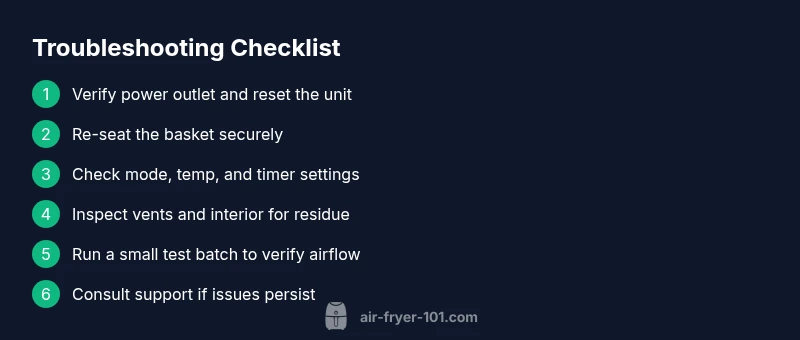
Most Gourmia digital air fryer problems start with simple, fixable issues. The two most common are power/start failures and uneven cooking caused by incorrect settings or overcrowded baskets. Start by confirming the outlet is live, unplugging to reset, reseating the basket, and verifying the mode, temperature, and timer. If the problem persists, follow the diagnostic flow below.
Common symptoms and quick checks
If your Gourmia digital air fryer won’t respond or foods aren’t browning evenly, you’re likely facing a common issue that home cooks encounter. According to Air Fryer 101, most early symptoms trace back to setup or setting mistakes rather than faulty hardware. Start with quick checks you can perform in minutes: confirm the wall outlet is live by testing another device, unplug the unit for a 60-second reset, reseat the cooking basket to ensure full contact with the contacts, and verify that you’ve selected a supported mode and temperature. If the display is blank, the unit restarts mid-cycle, or you hear an odd beep, note any error codes and keep the unit unplugged until you’re ready to test again. Keeping a small log of when issues occur helps identify patterns, such as after heavy loading or when switching between modes. This triage often resolves issues without tools and saves time before pursuing service.
Immediate fixes you can try first
Before taking the unit apart, try the simplest remedies. Ensure the air fryer sits on a stable, heat-resistant surface away from water. Check that the power cord is intact and firmly plugged in; avoid extension cords or power strips that can limit current. Remove and reinsert the basket, making sure it clicks securely into place and isn’t slightly misaligned. Double-check that you haven’t exceeded the recommended food load and that the basket is balanced to allow free airflow. Review the recipe guide or app for that model to confirm you’re using the recommended temperature, time, and any preheating requirements. If you recently rotated foods or switched to a new cooking mode, revert to a familiar setting and run a short test batch with minimal load. If the problem persists, proceed to the diagnostic flow below. This approach aligns with Air Fryer 101’s emphasis on starting with non-invasive, quick fixes rather than jumping to conclusions.
Common causes behind power and start issues
Power and start issues are the first red flags. The most likely cause is a simple power issue: a faulty outlet, a damaged cord, or a surge that trips the built-in protector. Another frequent factor is improper basket seating; if the basket isn’t fully seated, the unit may fail to complete its safety checks and halt. User settings can also trip up beginners: some Gourmia models require a specific combination of mode, temperature, and timer; selecting an incompatible combo can cause the display to blink or the unit to shut down. A dirty interior, blocked air intake, or a clogged exhaust vent can trigger protective shutdowns after a few minutes of operation. Keep an eye on any unusual smells, smoke, or heat at the exterior—these signal potential overload or airflow problems. Air Fryer 101 analysis shows that cleaning or reseating components often resolves these issues without tools, saving time and avoiding unnecessary replacements.
How airflow, temperature, and load affect cooking quality
Uneven browning, undercooked centers, or smoky interiors are frequently caused by airflow, temperature, and loading. When the basket is too full, hot air cannot circulate properly, leading to uneven results. Conversely, cooking too small a batch or overcrowding the basket can cause soggy edges and longer cook times. Always preheat if your model supports it; preheating creates a moisture-free surface that accelerates browning. Another common pitfall is using a temperature that’s too high for delicate foods; start with lower temps and shorter times, then adjust in 5- to 10-degree increments. If you notice white wisps or smoke, turn off the unit, unplug, and inspect for oil residue on the interior walls or heating element—wipe clean with a non-abrasive cloth and re-test after drying. Finally, confirm you’re using the correct cooking rack or basket insert for the recipe, as a misfit accessory can disrupt airflow and ruin results. Air Fryer 101 finds these adjustments dramatically improve consistency for Gourmia models.
Error codes and what they mean
Many Gourmia digital air fryers display alphanumeric codes to signal faults. Common codes relate to overheating, door safety, or sensor faults. If you see a blinking indicator or an error code, consult the model-specific manual to decode the message. In many cases, a simple reset resolves the fault: unplug for 60 seconds, then plug back in and select a basic bake cycle with a small batch. If the code persists, service may be required, particularly if the unit is under warranty. Always note the exact code and any accompanying lights, as this helps customer support diagnose the issue faster. Air Fryer 101’s research indicates that misinterpretation of codes is the leading cause of unnecessary returns, so keep the manual handy and verify compatibility when seeking replacements.
Maintenance habits to prevent future problems
Prevention is better than repair. Regularly clean the basket, crisper tray, and interior air vents after use to prevent residue buildup that can trigger odors or airflow restrictions. A quick wipe with a damp cloth and a mild detergent is usually enough; avoid abrasive cleaners that could damage coatings. Periodically inspect the power cord for wear and ensure the plug contacts are clean and dry. Store the unit in a dry, cool place, away from heat sources. Inspect the door seal if applicable and replace worn gaskets to prevent air leaks. For frequent cooks, schedule a monthly deep-clean, including the interior fan housing if you’re comfortable; otherwise, seek professional help. Air Fryer 101 emphasizes routine maintenance as the best defense against erratic performance and unexpected breakdowns.
Cleaning and troubleshooting when the unit starts to stink or smoke
Odors and smoke require immediate action. Stop the cycle and unplug the unit. Remove the basket and tray, and inspect for stuck food particles. Clean the interior walls with a dry cloth to remove baked-on fat and crumbs, then wash the basket and tray with warm soapy water. Inspect the heating element carefully for residue that could ignite, and wipe away any film with a non-abrasive sponge. Reassemble and run a short test batch with a small amount of oil-free air to ensure airflow remains clear. If you still see smoke or detect a burning smell, discontinue use and contact Gourmia support. Do not bypass safety features. Regular cleaning and proper loading are the best preventers of smoke and odor.
When to replace parts or seek professional help
While many Gourmia issues are fixable without tools, some problems require professional service. If the unit fails to power on after a full reset and you notice a damaged cord, scorching smell, or inconsistent heat that does not improve with adjustments, contact a warranty-authorized service center or Gourmia support. Document the model, serial number, and purchase date to expedite service. If your appliance is under warranty, do not attempt DIY repairs that could void coverage. Air Fryer 101 recommends evaluating the cost of repair versus replacement, especially for older units. Consider upgrading to a newer Gourmia model with updated safety features if frequent faults occur. A quick consultation with a technician can prevent safety risks and long-term frustrations.
Quick-reference troubleshooting cheat sheet
Keep this cheat sheet handy for fast decisions during cooking sessions. If you see power issues, start with the outlet and a reset; if heat is inconsistent, reduce the load and verify preheat guidelines; for overheating, stop and clean vents; for error codes, note the code and reset; and for cleaning, always unplug and wash components after use. By systematically ruling out basic problems, you’ll reduce downtime and maintain performance. Remember to consult the user manual for model-specific instructions and confirm you’re using the recommended accessories. Regular attention to maintenance and careful loading translates into reliable results across Gourmia’s digital air fryer lineup.
Steps
Estimated time: 20-30 minutes
- 1
Power reset and safety check
Unplug the unit and wait 60 seconds to reset the control board. Inspect the surface for heat or moisture and ensure the outlet is functioning by testing another device. Plug back in and power on to see if the display responds.
Tip: Always unplug before handling any internal components. - 2
Re-seat basket and verify seating
Open the door, remove the basket, and inspect for any visible damage. Reinsert the basket until you hear a clear click indicating secure seating and proper contact with the electronics.
Tip: A secure click usually means the safety switch will engage properly. - 3
Check mode, temperature, and timer
Select a known-good mode (e.g., bake or air fry), verify the temperature matches the recipe, and set a short timer. Avoid using incompatible combinations that could trigger errors.
Tip: Consult the recipe guide for model-specific values. - 4
Inspect vents and interior cleanliness
With the unit cool, wipe the exterior and inspect air vents for dust or grease. Clean the basket well; ensure the interior walls aren’t coated with residue that could affect heat distribution.
Tip: Use a soft brush to loosen stubborn crumbs. - 5
Run a test batch with minimal load
Place a small amount of food to test airflow and temperature response. Observe for even browning and consistent heat delivery within the expected time frame.
Tip: Avoid overloading for the test to get accurate results. - 6
Escalation: contact support if unresolved
If the unit still won’t start or faults persist after these steps, collect model/serial numbers and any error codes and contact customer support or initiate warranty service.
Tip: Have photos of the unit and codes ready to speed up troubleshooting.
Diagnosis: Power won’t turn on or the unit stops mid-cycle
Possible Causes
- highPower outlet or cord issue
- mediumTripped circuit or blown fuse
- lowDoor safety switch or wiring fault (model-dependent)
Fixes
- easyPlug into a known-good outlet and test with another device to confirm power
- easyTry another outlet; reset the unit by unplugging for 60 seconds, then plug back in
- easyInspect cord for damage and ensure plug is fully inserted; replace cord if frayed or loose
Got Questions?
Why won't my Gourmia digital air fryer start even when plugged in?
Check the outlet, test another device, ensure the cord isn’t damaged, and re-seat the basket. If needed, reset the unit by unplugging for 60 seconds and then plugging back in. If it still won’t start, proceed with the diagnostic flow.
Check the outlet and cord, then reset the unit. If it still won’t start, follow the diagnostic steps.
What do common Gourmia error codes indicate?
Error codes typically signal overheating, door safety issues, or sensor faults. Note the code and refer to the model manual for specifics, then reset and re-test. If codes persist, contact support.
Error codes point to safety or heat issues—note the code and check the manual.
Is it safe to use foil or metal in the Gourmia air fryer?
Avoid using metal or foil that can block airflow. If used, ensure it won’t contact the heating element and won’t obstruct vents. Prefer parchment or the manufacturer-recommended accessories.
Usually best to avoid foil or metal in the basket.
How do I clean the Gourmia air fryer safely?
Unplug and let cool, remove the basket and tray, wash with mild soap, and wipe the exterior. Dry all parts completely before reassembly. Regular cleaning prevents residue buildup that affects performance.
Unplug, wash the basket and tray, wipe the outside, and dry before use.
When should I contact support or warranty service?
If the unit fails to operate after the basic troubleshooting, shows persistent error codes, or has signs of damage or unusual odors, contact support or check warranty terms.
If it still doesn’t work after troubleshooting, reach out to support.
Does preheating affect troubleshooting?
Preheating guidelines vary by model; using the recommended preheat can improve browning and cooking consistency. If in doubt, follow the recipe or user manual for preheat requirements.
Preheating can help with browning, but check your model’s guidelines.
Watch Video
Quick Summary
- Start with power, basket seating, and basic settings.
- Avoid overloading the basket to maintain airflow.
- Follow a step-by-step diagnostic flow before replacing parts.
- Regular cleaning prevents most performance problems.