How to Know When Your Ninja Air Fryer Is Preheated
Learn how to tell when your Ninja air fryer is preheated with clear indicators, practical cues, and model-aware tips. This guide covers signs, timing, and best practices for consistent, delicious results every time.


To know when your Ninja air fryer is preheated: set the target temperature, then watch for the preheat cue. If your model has a signal, wait for the light, beep, or display to confirm readiness. If there’s no cue, allow a short wait—typically 2–5 minutes—and verify with the built-in readout or by testing a small item.
Why Preheating Matters for Ninja Air Fryers
Preheating isn’t just a formality; it establishes the heat environment that drives even airflow across your food. When you start from a hot chamber, foods like chicken wings, French fries, or vegetables begin cooking immediately, reducing the risk of soggy centers and uneven browning. The Ninja line often emphasizes that readiness signals vary by model, so it’s essential to understand the cues your specific unit provides. Air Fryer 101 has found that practicing with your exact model helps you hit consistent results, especially for recipes that rely on a crisp exterior and juicy interior. In this guide, we’ll walk through signals, typical preheat times, and practical checks you can perform in any kitchen. By the end, you’ll be able to confirm readiness without guessing, no matter which Ninja model you own.
How Preheat Indicators Work on Ninja Models
Ninja air fryers deploy a few common cues to mark preheat completion. Many units display a ready icon or switch the panel from “preheating” to “ready” once the target temperature is reached. Some models emit a brief beep or light up an indicator when the chamber achieves temperature. If your Ninja lacks a visual cue, rely on a short, model-agnostic wait time and, when possible, a thermometer reading from the built-in display or an external probe. Remember: indicators vary by model, so always check the user manual for your exact Ninja model. Consistently using these cues helps avoid undercooked centers and overdone exteriors, especially for dense foods that require even heat from the start.
Quick Checks Before You Start Cooking
Before you begin preheating, remove the basket and empty it. Wipe away any residual oil or crumbs from the interior and basket to ensure accurate heat distribution and prevent off-flavors. Ensure the air path isn’t blocked by food remnants or oversized items. Return the basket to its position, and if your unit has a quick reset option or display, perform it to ensure accurate signaling. These preparatory steps help you get crisp, even results and prevent misreads that lead to undercooked edges or overly dark surfaces.
Common Pitfalls That Delay Preheating
One frequent issue is preheating with the basket in a cluttered state or with items still inside. This not only skews the temperature reading but can also trap moisture and slow air flow. Another pitfall is relying solely on time rather than cues—your model may reach the target temperature sooner or later depending on ambient temperature and load. Lastly, coarser dietary items tend to require a longer preheat window for even surface browning. By avoiding these pitfalls, you’ll consistently hit the target texture and doneness.
How to Adapt Preheat for Different Foods
Different foods respond to preheating in varying ways. For dense proteins like bone-in chicken, a full preheat plus a short rest after loading can promote crispy exteriors and juicy centers. For delicate items or quick-cooking vegetables, a shorter preheat may suffice, but you should still verify readiness to prevent sogginess. If you’re cooking multiple batches, a brief additional preheat between batches can help maintain consistent temperature. The key is to observe how your particular Ninja model behaves and adjust your preheat duration accordingly.
Model-Specific Cues: Do This, Not That
Because Ninja models differ, it’s essential to consult the manual for your exact unit. If your model shows a 'ready' indicator, use it consistently. If there’s no indicator, rely on a reliable wait time (2–5 minutes) plus a temperature readout, if available. Do not assume preheat is done simply because the timer stops; check for the actual readiness cue. By syncing your approach to the model, you’ll improve repeatability across recipes and avoid guesswork.
How to Time Preheat Without a Built-In Indicator
When there’s no explicit preheat indicator, a practical method is to start your timer as soon as you press start at the target temperature. Allow 3–5 minutes, then check the readout or perform a quick test with a tiny piece of food to gauge heat readiness. If your unit seems slow to reach temperature, increase the preheat window by 1–2 minutes in subsequent runs. Keep a small log of your model’s behavior to refine your timing over time.
When to Preheat Longer or Shorter
In general, higher target temperatures require a slightly longer preheat in most Ninja models, while lower temperatures can reach readiness faster. If you’re cooking large batches or thick-cut foods, a longer preheat helps ensure the interior reaches the desired heat level before air circulation begins. For thin slices or light items, a shorter preheat often suffices. The goal is to start cooking with already-hot air circulating, not to rely on heat building during the first minutes.
Safety and Maintenance During Preheating
Always follow basic safety: keep hands away from the hot basket handles, use oven mitts when loading or unloading, and never bypass built-in safety interlocks. Regularly clean the air fryer interior and basket to prevent oil buildup, which can affect heat transfer and flavor. If you notice unusual smells, unusual noises, or overheating, discontinue use and consult the manual for troubleshooting or contact customer support. Routine cleaning helps you maintain accurate readouts and consistent preheat performance.
Tools & Materials
- Ninja air fryer (model in use)(Ensure it’s clean, empty, and ready for preheating)
- Oven mitts or heat-resistant gloves(For safe handling of hot baskets and racks)
- Digital thermometer or built-in temperature readout(Use to verify final preheat temperature if available)
- Timer (phone or kitchen timer)(Helpful when your model lacks a visual preheat cue)
Steps
Estimated time: Total time: 5-7 minutes (typical preheat window varies by model and temperature)
- 1
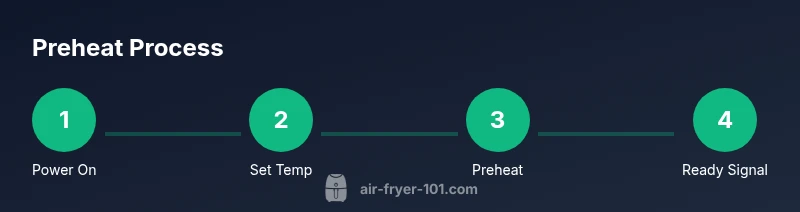
Power on and set target temperature
Turn on the Ninja air fryer and enter the desired preheat temperature for your recipe. This establishes the heat baseline so the chamber can reach the target quickly once preheat begins. Why: starting from the correct temperature ensures even air flow from the outset, improving browning and texture.
Tip: Double-check the temperature display before starting to avoid overshooting. - 2
Start preheating
Press start or the preheat function and allow the unit to begin heating. If your model lacks a dedicated preheat option, simply set the temperature and start the cycle. Why: initiating the cycle ensures the air within the chamber begins circulating at speed and at the intended heat level.
Tip: Use a timer to track the preheat window for consistency. - 3
Watch for cues
Observe the control panel for a ready indicator, countdown, or beep. If your model has a temperature readout, confirm it matches the target. Why: cues confirm readiness without guesswork and reduce undercooked centers.
Tip: If you’re unsure, perform a quick test with a tiny item after the cue appears. - 4
Verify readiness (optional)
If you have a thermometer or built-in readout, verify that the chamber has reached the target temperature. Why: this step provides objective confirmation, especially for dense foods.
Tip: Take care not to touch hot components when measuring. - 5
Load food and begin cooking
Carefully place your food into the basket and begin cooking according to the recipe. Why: preheated air should immediately start crisping the surface, reducing overall cook time.
Tip: Do not overcrowd; give air space to keep crisp texture. - 6
Monitor and adjust if needed
If browning seems uneven, pause briefly to reshuffle or shake the basket, then resume. Why: even exposure to hot air is key for uniform results, especially with mixed batches.
Tip: Use tongs to flip larger items halfway through cooking.
Got Questions?
How long does it typically take a Ninja air fryer to preheat?
Most Ninja models take a few minutes to reach the target temperature, often within 2–5 minutes depending on the temperature and model. Always check your manual for model-specific guidance.
Most Ninja air fryers preheat in a few minutes, but check your manual for your exact model.
What indicators show preheating is complete on Ninja air fryers?
Look for a ready icon, change from preheating to ready on the display, or a beep when the target temp is reached. Some models rely on a timer cue instead of a dedicated indicator.
Look for a ready cue on the display or a beep when it reaches temperature.
Can I skip preheating with Ninja air fryers?
Preheating is optional for some quick-cooking items, but it's generally recommended for even browning and texture. You can skip for very thin foods or when you’re short on time, but expect different results.
You can skip if you’re short on time, but expect less even browning.
How can I verify the interior temperature during preheat?
If your Ninja model includes a temperature readout, use it to confirm the chamber reaches the target. If not, a thermometer with an external probe can help, though it may be less precise for airflow-readiness cues.
Use the built-in readout if available, or a probe thermometer for extra confirmation.
Why would a Ninja model not show a preheat indicator?
Some models rely on a timer or an on-screen readiness message instead of a dedicated preheat icon. Always refer to the user manual for your exact model’s cues.
Some models don’t have a preheat icon; check the manual for your model’s signals.
Is preheating necessary for frozen foods?
Preheating helps frozen foods start cooking immediately and evenly, but the necessity depends on the recipe and item size. When in doubt, preheat a few minutes longer for denser items.
Preheating helps, especially with frozen items; adjust per the recipe.
What should I do if the preheat seems to take too long?
Check for air path obstructions, temperature setting accuracy, and whether the basket is improperly placed. If issues persist, reset the unit and consult the manual or support.
If it slows down, check the setup and reset if needed.
Watch Video
Quick Summary
- Know your model’s preheat cues and rely on them.
- Preheating improves even cooking and browning.
- Use timing or readouts to confirm readiness rather than guesswork.
- Protect yourself with proper safety measures when handling hot components.